Turn plans into action
Aev Schedule
Organise. Plan. Achieve.
Calendar, tasks and agendas.
From £14.99Students from £7.99 with a verified education email
Home, Student, Professional and Business licences. One-time purchase.
- Windows 10 and 11 (64-bit)
Features
What Schedule does
Calendar
Day, week and month views with recurring events.
Tasks
Tasks with subtasks alongside the calendar.
ICS import and export
Importing the same calendar twice does not duplicate entries.
Agenda
An agenda exported as PDF.
Autosave
Every stored entry loads; autosave and recovery are built in.
- Local-firstYour data. Your control.
- Works offlineAnywhere. Anytime.
- Private and secureBuilt for peace of mind.
- One-time purchaseNo subscriptions.
Overview
About Aev Schedule
Aev Schedule plans days, weeks and months on your own computer with calendars, recurring events and tasks. It is part of the Aevornix Suite and needs no account or server.
In the current release
- Day, week and month calendars, recurring events, tasks with subtasks, ICS import and export, and an agenda as PDF.
- Every stored entry loads, and importing the same calendar twice does not duplicate entries.
- Autosave and recovery, and search across saved documents from Aev Word, Aev Book and Aev BI.
Problems it solves
- Planning without a cloud calendar account
- Moving calendars in and out through ICS files
Offline and local
Aev Schedule works with no internet connection and keeps calendars and tasks on your computer.
Made for
- Freelancers
- Students
- Small teams
Formats
- Import and export
- ICS
- Agenda
Screenshots
Aev Schedule on screen
- Aev Schedule
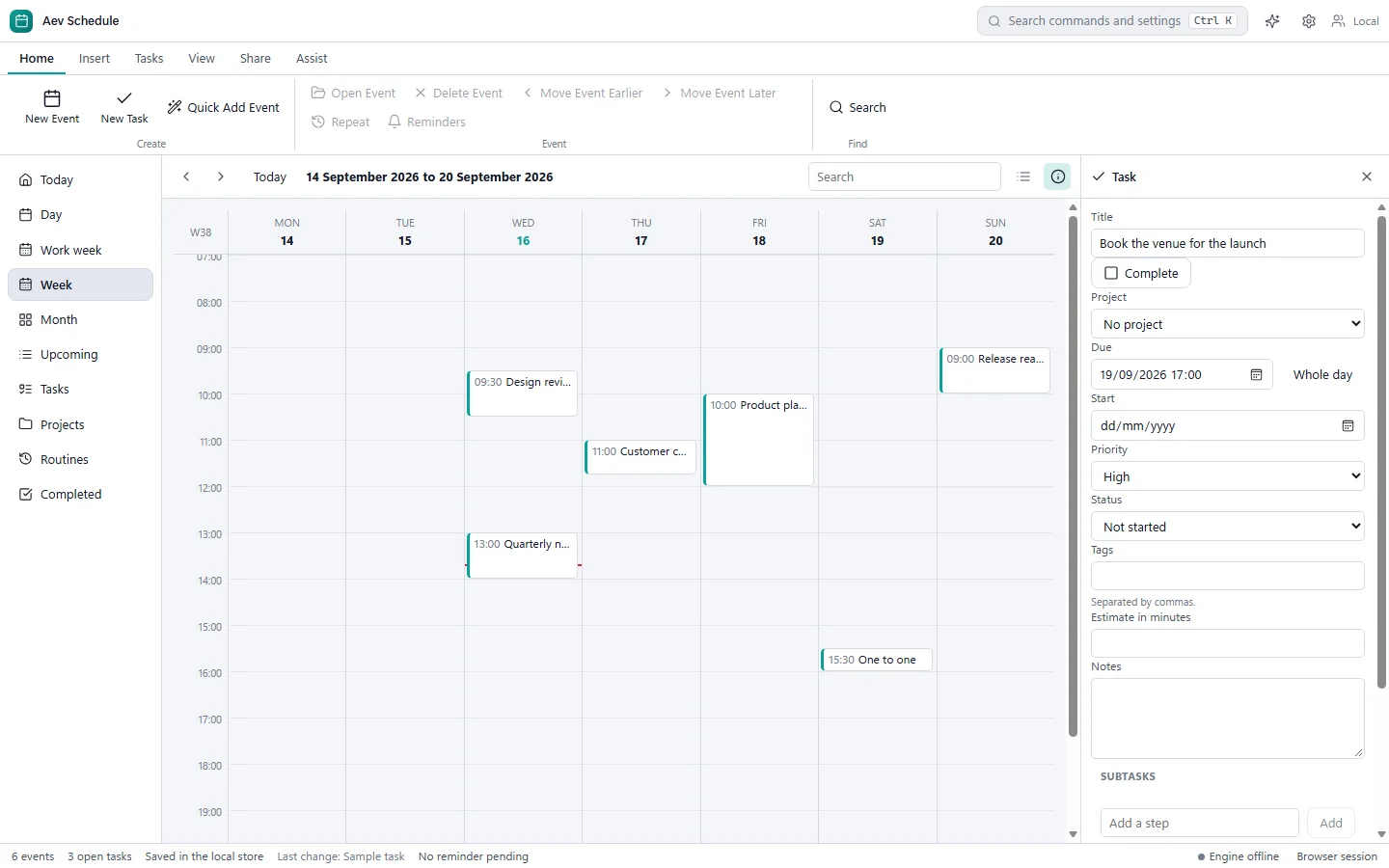
Aev Schedule week view for 14 to 20 September 2026 with scheduled items on the calendar and a task detail panel on the right.
Buy
Own Aev Schedule
One-time purchase. Choose the licence that matches how you will use it.
Consumers can cancel within 14 days until the licence is delivered, and faulty software stays covered by statutory rights afterwards. Refund terms
- 1 named user
- Up to 3 personally owned devices
- Personal and household use
- Non-commercial use
- Maintenance updates included
- One-time purchase, permanent licence for this major version
Professional adds commercial use for £15.00 more.
Total
£14.99
Aev Schedule, Home licence. Prices in GBP. Compare licences
Details
Requirements and licence
System requirements
- Windows 10 or Windows 11, 64-bit
- Installer downloaded from your order page after purchase
Release: Early access, version 1.6.0
Early access means the capabilities listed above are built and checked; what is still being learned is how the application behaves across a wide range of machines. Updates for this major version are included in the licence.
Released
All system requirementsLicence
- One-time purchase in Home, Student, Professional or Business tiers.
- Permanent for the major version you buy, with maintenance updates for that version.
- Future major versions are separate upgrades.
Not yet included
- Import fidelity work, enterprise controls and collaboration are still in development.
- Reminders while the application is closed need a background service that is not built yet.
Aev Schedule questions
Can I import my existing calendar?
Yes, through ICS files, which most calendar services can export. Aev Schedule also exports ICS.
Do reminders work when the app is closed?
Not yet. Reminders while the application is closed need a background service that is still to be built.
Is it a subscription?
No. Each licence is a one-time purchase, permanent for the major version you buy, and includes maintenance updates for that version. Future major versions are separate upgrades. See how licences work.